Using CyberCheck360 Link Inspector
4.1 How Link Inspection Works
When you visit a website, CyberCheck360 automatically checks it in the background. Here is what it looks at:
- Is the domain newly registered? Very new sites are flagged for further checks.
- Is the site on a known-dangerous list? If yes, you get an ⛔ Unsafe warning immediately.
- Is the page pretending to be a different brand? If the site claims to represent a well-known name but is hosted somewhere else entirely, you get a Phishing warning.
- Is the page trying to download a file automatically? If yes, the download is blocked and you are asked what to do.
If none of these apply, you see a ✅ Safe result and browsing continues normally.
Sites you have whitelisted are skipped entirely.
4.2 Understanding Verdicts and Warning Pages
✅ Safe
No issues detected. The site is established and not listed as dangerous. Browsing continues without any interruption.
⚠️ Caution (popup)
Caution verdict is shown for:
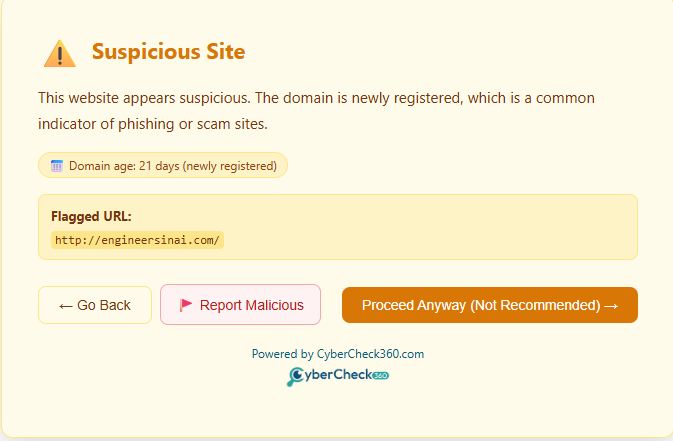
- The site's domain was registered recently (less than 1 year) and has not been confirmed as dangerous.
In this case, there is no confirmed threat but caution is advised. You get a warning with three options:
- ← Go Back - Return to the previous page.
- Proceed Anyway - Continue to the site at your own risk.
- Report Malicious - Report as Malicious
⛔ Unsafe
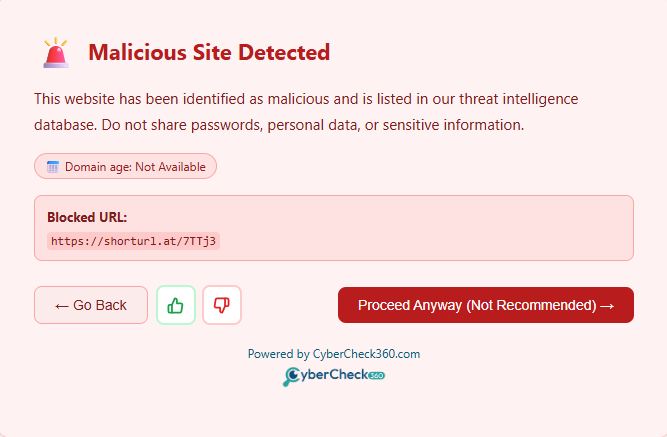
The site or URL is on CyberCheck360's list of known dangerous sites. The warning page shows:
- A safety message: "This website has been identified as malicious and is listed in our threat intelligence database. Do not share passwords, personal data, or sensitive information."
- How old the domain is (e.g. "Domain age: 5 days (newly registered)")
- The Blocked URL
- Buttons: ← Go Back, Thumps up/down and Proceed Anyway (Not Recommended) →
Proceed Anyway only appears when Allow access to malicious sites is switched On in Settings. Turning it Off(Recommended) removes the button, you can only go back.
⚠️ Unknown
Unknown verdict is shown for
- The domain's age could not be verified, and the site is not on any known-dangerous list.
We do not show any warning message and Browsing continues without any interruption.
Possible Phishing Detected (To be Released in Version 1.0.4)
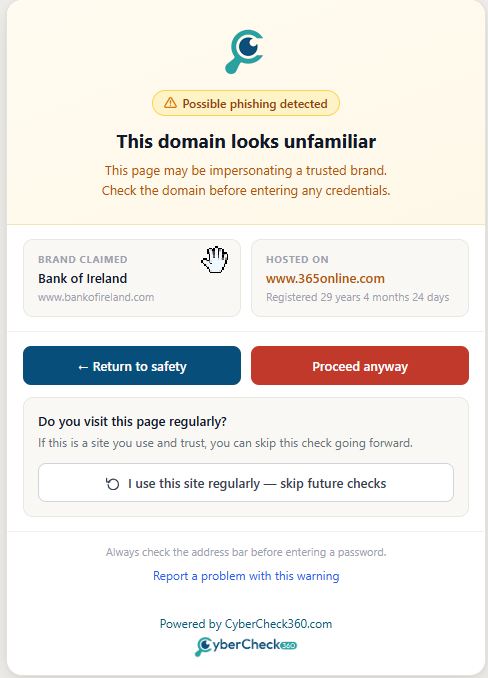
The site appears to be impersonating a well-known brand. The warning page shows:
- Alert badge: ⚠️ Possible phishing detected
- Heading: This domain looks unfamiliar
- Sub-heading: "This page may be impersonating a trusted brand. Check the domain before entering any credentials."
- A side-by-side comparison card showing:
- Brand Claimed — the brand name the site is pretending to belong to, along with the legitimate domain (e.g. Bank of Ireland — www.bankofireland.com)
- Hosted On — the actual domain the page is served from, along with its registration age (e.g. www.365online.com — Registered 29 years 4 months 24 days)
- Buttons: ← Return to Safety and Proceed Anyway
- Skip future checks option: "Do you visit this page regularly? If this is a site you use and trust, you can skip this check going forward."
- Button: ↺ I use this site regularly — skip future checks
- Tip: "Always check the address bar before entering a password."
- Report link: Report a problem with this warning
Download Blocked (To be Released in Version 1.0.5)
A website tried to download a file to your device automatically without you clicking a download link. A warning appears showing:
- Heading: Download Blocked
- Message: "CyberCheck360 blocked a file download from this page. Only proceed if you intentionally initiated this download from a trusted source."
- The filename and file type (e.g.
auto-download-test.txt/.txt) - The Download source URL
- Buttons: Close and Download Anyway →
If you did not click anything to start a download, click Close. Websites that push automatic downloads are a common way to deliver malware.
 Chrome
 Firefox
Warning Display Modes
| Mode | How it works |
|---|---|
| Warning Page (recommended) | A full-screen warning replaces the page. You must choose before you can do anything else. |
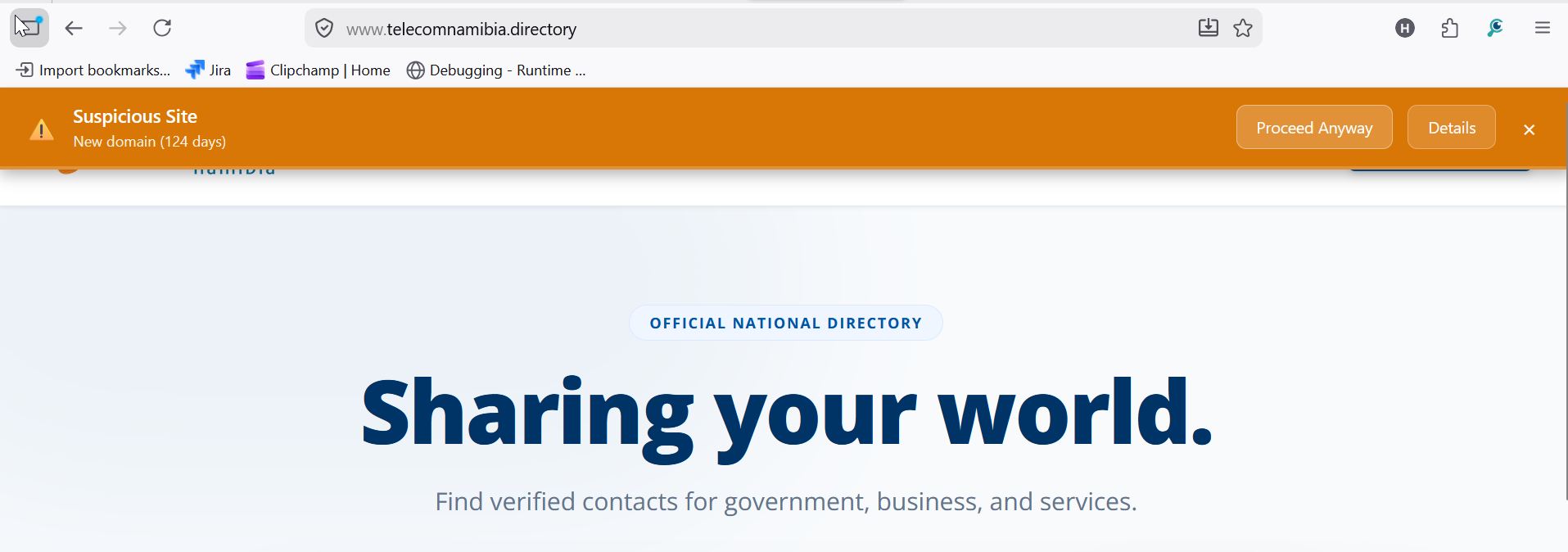
| Banner | A strip appears at the top of the page. The site still loads behind it. |
4.3 Banking Site Detection
CyberCheck360 automatically recognises banking and financial websites. When a banking site is detected, link inspection is paused immediately to ensure there is no interference with your login or session.
How It Works
When you land on a recognised banking or financial site, CyberCheck360 pauses protection in the background — no action is needed from you. If the site is already known and verified in our system, this happens silently and you will not see any prompt.
Banking Site Detected — User Confirmation
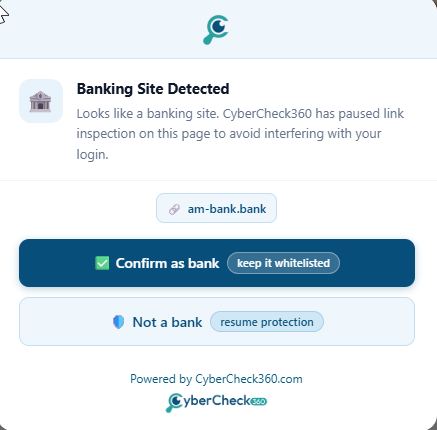
If CyberCheck360 detects a likely banking site that has not yet been verified in our system, a confirmation popup will appear:
🏦 Banking Site Detected Looks like a banking site. CyberCheck360 has paused link inspection on this page to avoid interfering with your login.
The domain name of the detected site is shown, along with two options:
| Option | What it does |
|---|---|
| ✅ Confirm as bank (keep it whitelisted) | Confirms this is a legitimate banking site. Your preference is saved — this prompt will not appear again for this domain. Link inspection remains paused on all future visits. |
| 🔵 Not a bank (resume protection) | Tells CyberCheck360 this is not a banking site. Link inspection resumes immediately and you will be asked to confirm again on future visits. |
Tip: If you are on your bank's official website and see this prompt, click Confirm as bank. This whitelists the domain and ensures your banking sessions are never interrupted.
Why Does CyberCheck360 Pause on Banking Sites?
Banking and financial websites use complex, sensitive login flows. By automatically pausing link inspection on verified banking sites, CyberCheck360 ensures your login experience stays smooth and uninterrupted — while keeping full protection active everywhere else.
Ready to add click-time protection to your email security stack?
See how CyberCheck360 closes the gap that advanced phishing attacks exploit.