URL Sandbox Explained: Secure Link Isolation for Email Security
Quick Summary: Every link in your email is a potential threat. URL sandboxing lets you open any link inside an isolated, containerised browser session so threats never reach your device or network. CyberCheck360 takes this further with real-time blacklist checks, domain age analysis, organizational allow/block lists, and full zero-trust control over every link your team clicks.
Table of Contents
- What is URL Sandboxing?
- The Problem with Links in Email
- How Link Rewriting Works
- CyberCheck360 Secure Link — How It Works
- What Happens When a User Clicks a Link
- Raising a Local Browsing Request
- Zero Trust Link Policy for Your Organization
- How to Access the URL Sandbox
- Threats Stopped by URL Sandboxing
What is URL Sandboxing?
URL sandboxing is the practice of opening a web link inside a secure, isolated environment separate from your local browser, device, and network. so that any malicious content the link contains cannot affect you.
When a link is opened in a sandbox, the page loads inside a contained session. Any scripts, downloads, exploits, or trackers that execute do so within that isolated container. Once the session ends, everything is discarded. Nothing persists. Nothing reaches your device.
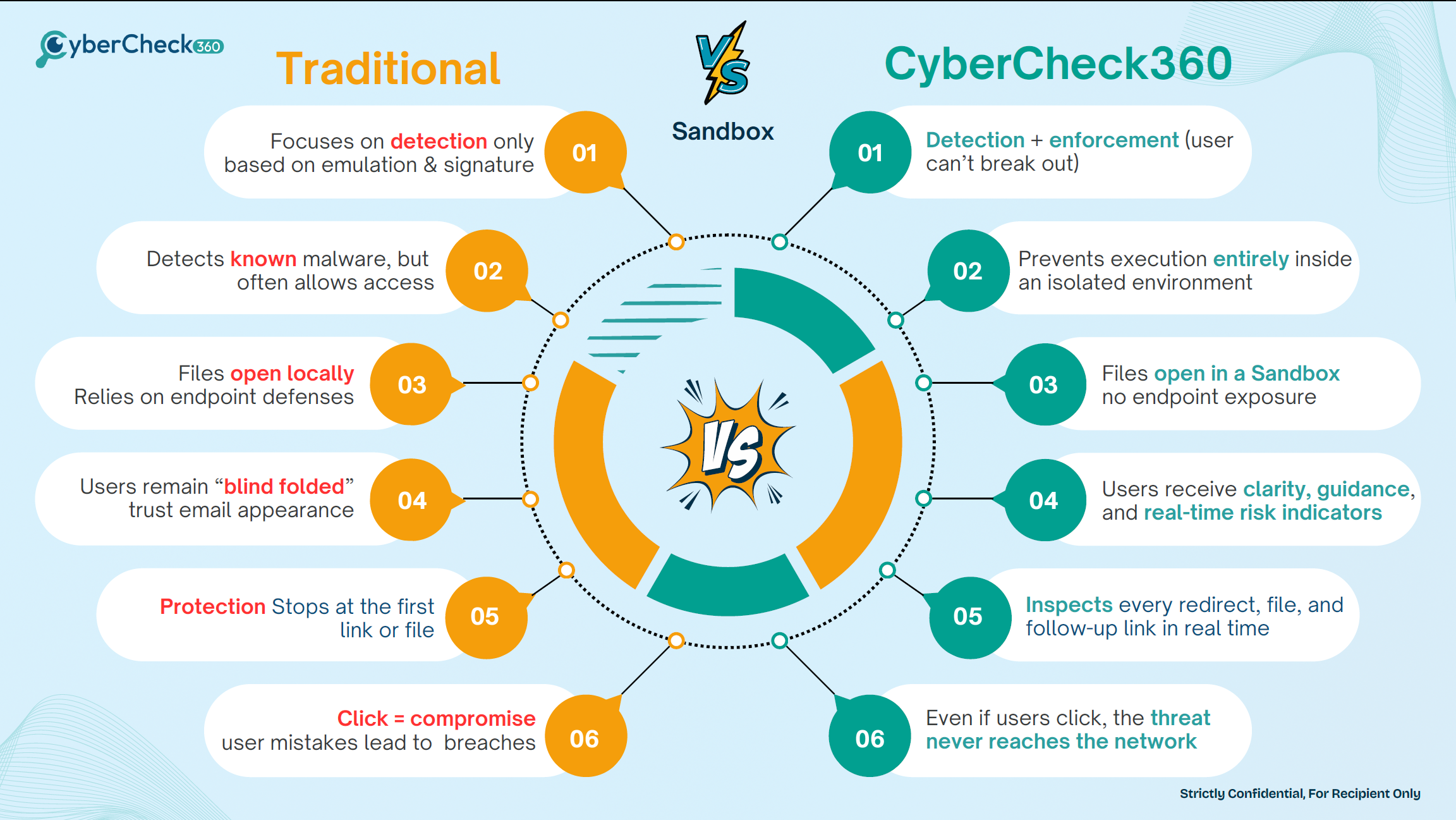
Traditional antivirus and email filters rely on known threat databases to block malicious links. URL sandboxing goes a step further, it lets you safely interact with and inspect a link in real time, even if the threat is brand new and not yet on any blacklist.
The Problem with Links in Email
Email remains the number one delivery method for cyberattacks. The vast majority of ransomware, phishing, and credential theft attacks begin with a single email and a single click.
Links embedded in emails are particularly dangerous because:
- They can redirect to a different destination after the email is delivered (time-of-click attacks)
- They can trigger drive-by downloads that execute malware the moment a page loads
- They can point to convincing phishing pages that steal credentials
- They can contain tracking pixels and fingerprinting scripts that profile the recipient
- They may come from trusted domains that have been compromised
Blacklist-only approaches cannot stop these threats. A newly registered phishing domain, a compromised legitimate domain, or a redirect chain that routes through clean infrastructure will pass straight through a reputation check.
URL sandboxing addresses this at the point of click, not just at the point of delivery.
How Link Rewriting Works
Link rewriting is one of the most common techniques used by email security platforms to intercept clicks before they reach the destination URL.
When an email passes through a security gateway that uses link rewriting:
- Every URL in the email body is replaced with a proxy URL pointing to the security vendor's infrastructure
- When the user clicks the link, the request goes to the proxy first, not the destination
- The proxy performs a real-time reputation check on the original URL
- If the URL passes, the user is redirected to the destination in their local browser
- If it fails, the user is blocked or warned
The Limitation of Traditional Link Rewriting
Standard link rewriting only checks reputation at the moment of click. Once the check passes, the user lands on the destination page in their own browser, on their own device. If the page contains a zero-day exploit, a drive-by download, or malicious JavaScript, the user is now fully exposed.
This is the gap that URL sandboxing fills.
CyberCheck360 Secure Link — How It Works
CyberCheck360 goes beyond traditional link rewriting. Instead of simply checking a link and redirecting the user to their local browser, CyberCheck360 intercepts every link click and opens the destination inside an isolated, containerised browser session.
The user browses the destination entirely within the secure container. Threats that execute on the page exploits, downloads, scripts are contained within that session and discarded when it ends.
Before opening any link, CyberCheck360 runs a multi-layer check:
1. Blacklist Check
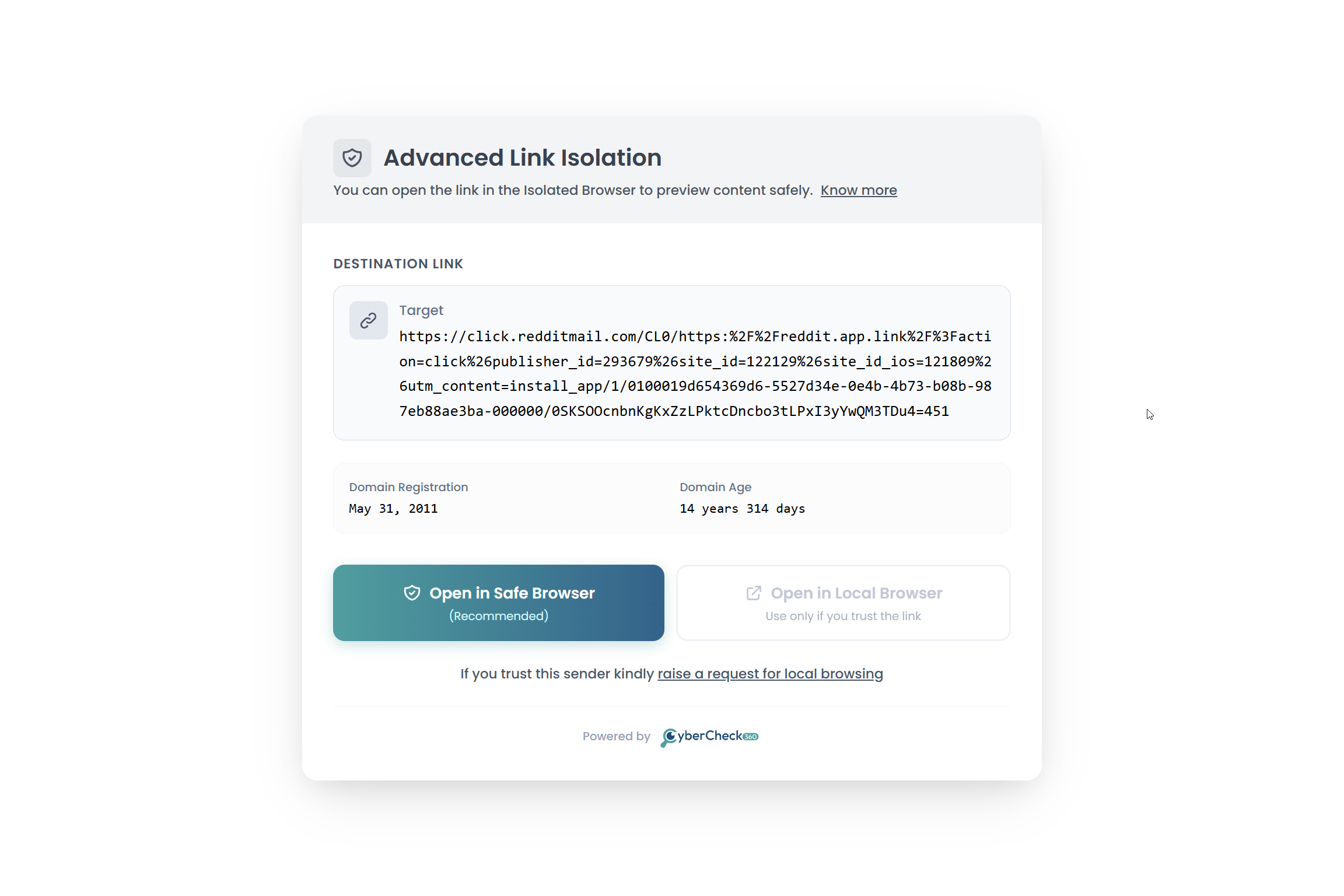
The destination URL and its domain are checked against global threat intelligence blacklists. Known malicious URLs and domains are flagged immediately.
2. Domain Age Analysis
Newly registered domains are a major indicator of phishing and fraud infrastructure. CyberCheck360 surfaces the domain registration date and domain age so users and administrators can make an informed decision before opening the link.
3. Organizational Blacklists and Allow Lists
Every organization has its own risk profile. CyberCheck360 allows administrators to define:
- Organizational Blacklists - domains or URLs that are always blocked for all users
- Organizational Allow Lists - trusted domains or URLs that users are permitted to open in their local browser
This gives security teams granular control over what their users can and cannot access, independent of global threat databases.
What Happens When a User Clicks a Link
When a user clicks a link inside an email whether from the CyberCheck360 extension, Gmail add-on, or email admin portal the following happens:
- The link is intercepted before it reaches the local browser
- Real-time checks are run blacklist, domain age, organizational policies
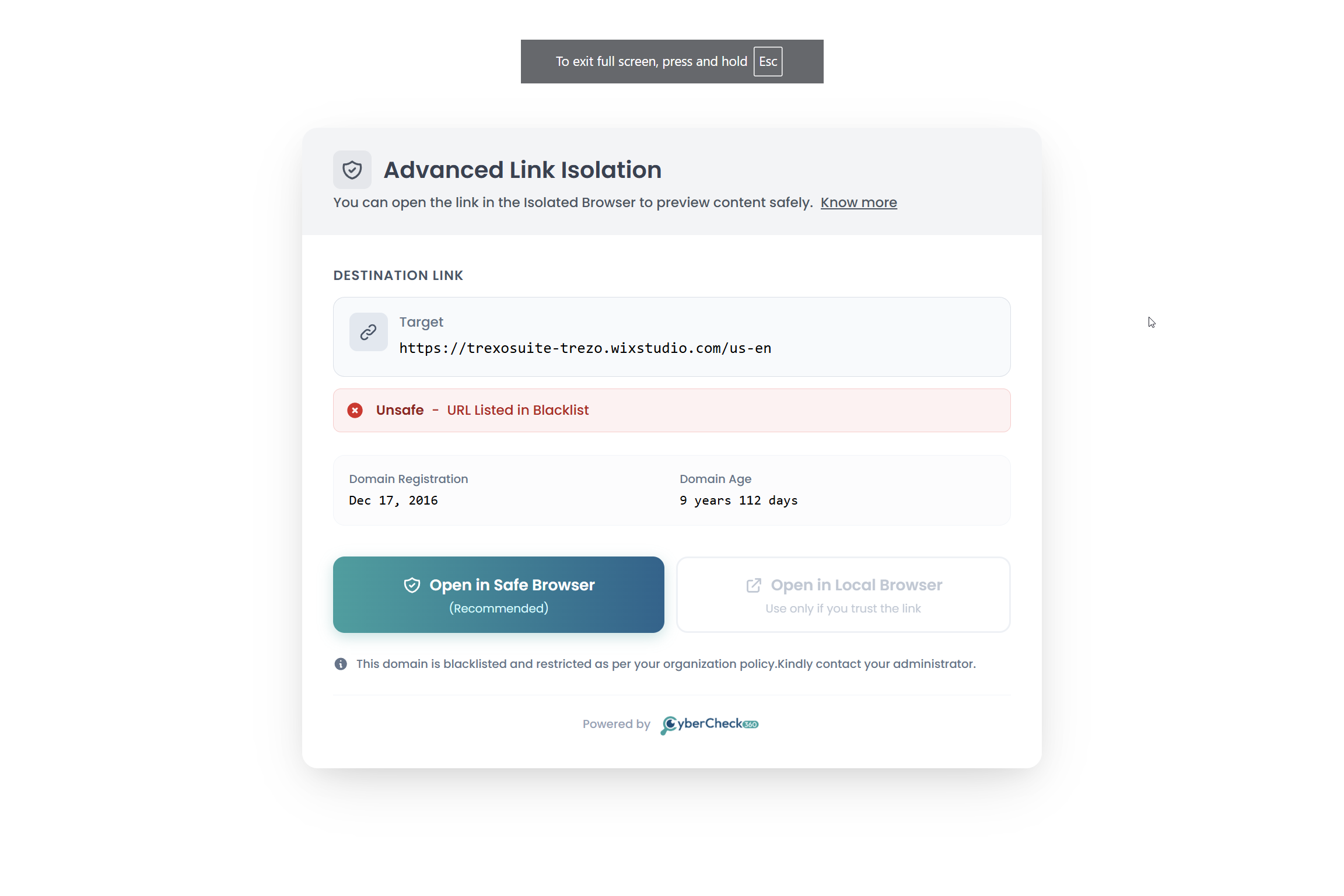
- The user is presented with the Advanced Link Isolation screen, showing:
- The destination URL
- Domain registration date and domain age
- Two options to proceed:
Option A: Open in Safe Browser (Recommended)
The link opens inside CyberCheck360's isolated, containerised browser. The user can view and interact with the page safely. Any threats that execute are contained and discarded after the session. The local device and network are never exposed.
Option B: Open in Local Browser
If the user recognises and trusts the link, they can choose to open it in their local browser. This option is available but not recommended by default it is intended for links the user is confident are safe.
Raising a Local Browsing Request
In some cases, a user may need to open a link in their local browser for legitimate reasons for example, to access an internal tool, a web application that requires a local session, or a trusted vendor portal.
If the link is not yet on the organizational allow list, the user can raise a local browsing request directly from the Advanced Link Isolation screen.
"If you trust this sender, kindly raise a request for local browsing."
How It Works
- The user clicks "raise a request for local browsing" on the isolation screen
- The request is sent to the organization's security administrator for review
- Once the administrator approves the request, the domain or URL is added to the organizational allow list
- The user can then open that link locally going forward
This ensures that local browser access is never unilaterally granted by the end user it always goes through an administrator approval process. Organizations maintain full visibility and control over what their users open locally.
Zero Trust Link Policy for Your Organization
CyberCheck360's secure link isolation implements a zero-trust approach to every URL clicked within your organization.
Under a zero-trust model, no link is trusted by default, regardless of the sender, the domain reputation, or how familiar the URL appears. Every link is verified and isolated before the user is exposed to it.
This approach protects against:
- Time-of-click phishing attacks - links that appear clean at delivery but redirect to malicious content when clicked
- Drive-by downloads - malware that executes automatically when a page loads
- Click-by-download threats - files that download silently without user interaction
- Local malware execution - scripts and exploits that run in the local browser environment
- Credential harvesting pages - convincing fake login pages that steal usernames and passwords
- Zero-day exploits - threats not yet on any blacklist
What This Means for Your Organization
| Without CyberCheck360 | With CyberCheck360 Secure Link |
|---|---|
| Every link opens directly in the local browser | Every link is isolated before reaching the local browser |
| Blacklist checks only at delivery time | Real-time checks at the moment of click |
| No visibility into domain age or registration | Domain age and registration surfaced to the user |
| No organizational control over link access | Admin-controlled allow lists and blacklists |
| Users decide unilaterally what to open | Local access requires administrator approval |
| Drive-by downloads reach the local device | All downloads contained within the isolated session |
How to Access the URL Sandbox
CyberCheck360's URL sandbox is available across multiple entry points depending on how your team works.
1. Free Web Sandbox
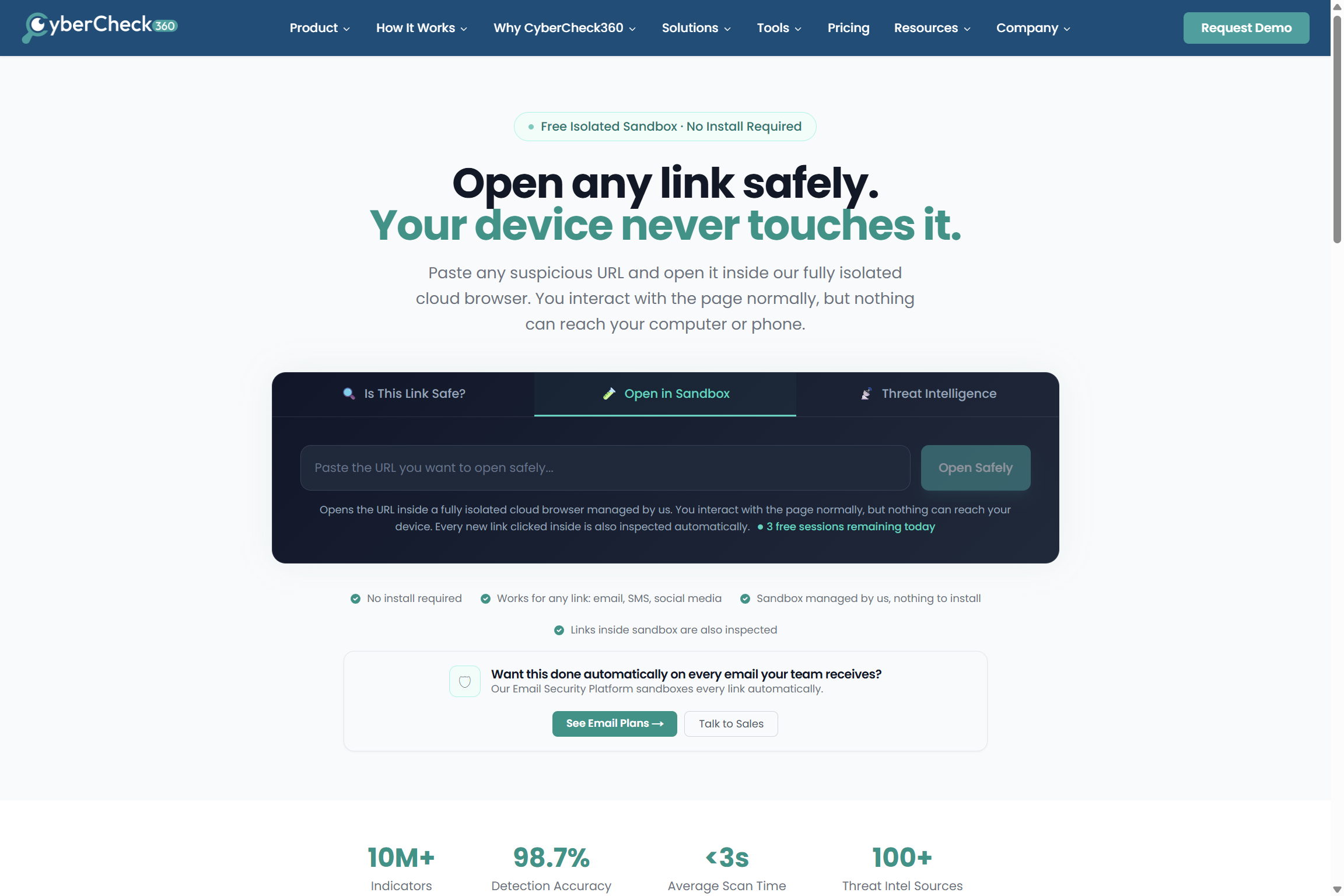
Open any link in the sandbox directly from the CyberCheck360 website no account required.
Access: https://cybercheck360.com/url-sandbox/
Paste any URL and open it in an isolated browser session instantly. Ideal for one-off checks on suspicious links.
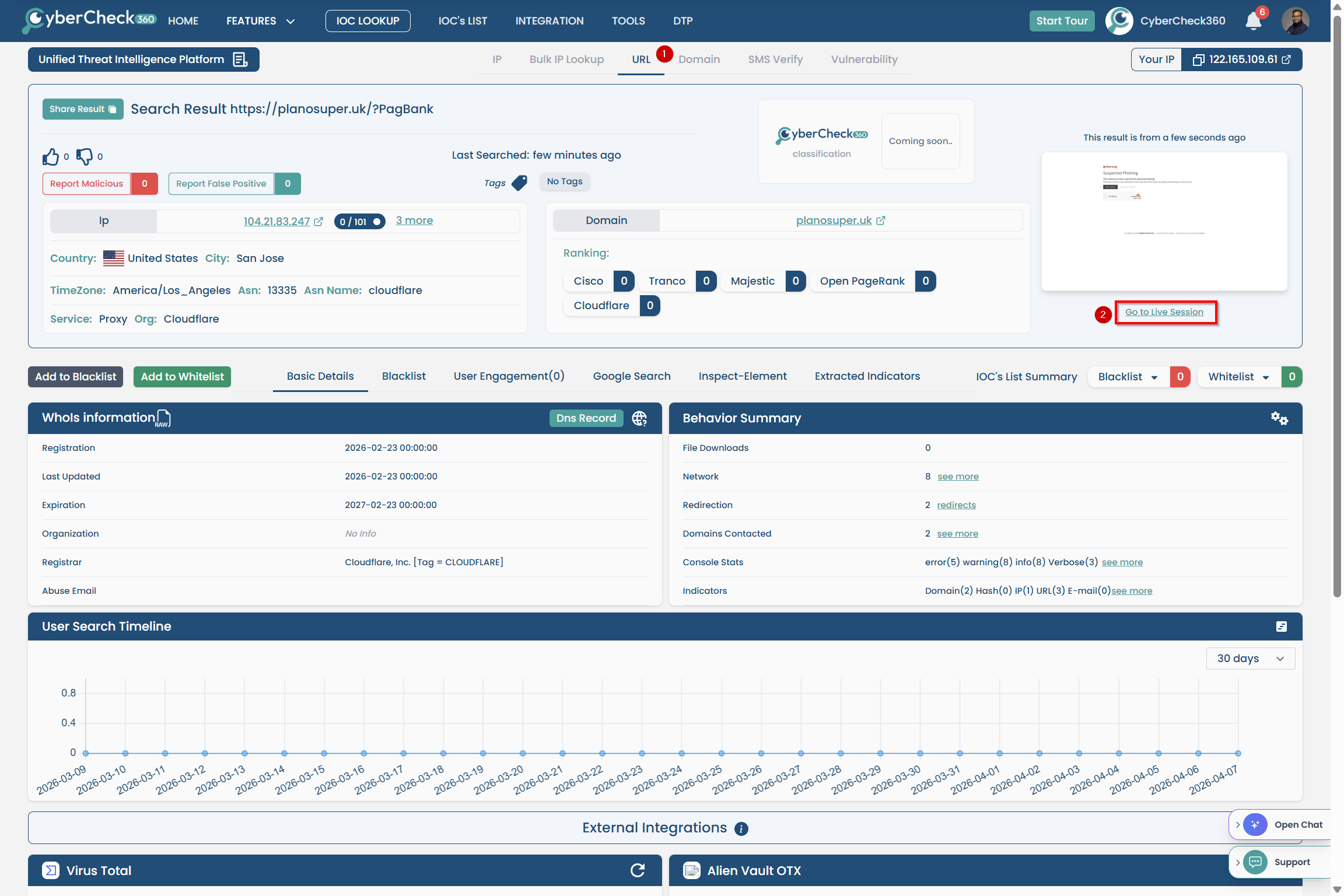
2. Threat Intelligence Platform (TIP)
CyberCheck360's Threat Intelligence Platform provides deep URL analysis alongside sandbox access.
Steps:
- Go to https://tip.cybercheck360.com/search/url-lookup
- Enter any URL in the IOC lookup search field
- Once results are returned, click "Go to Live Session"
- The URL opens inside a fully isolated sandbox session
3. Email Security Portal
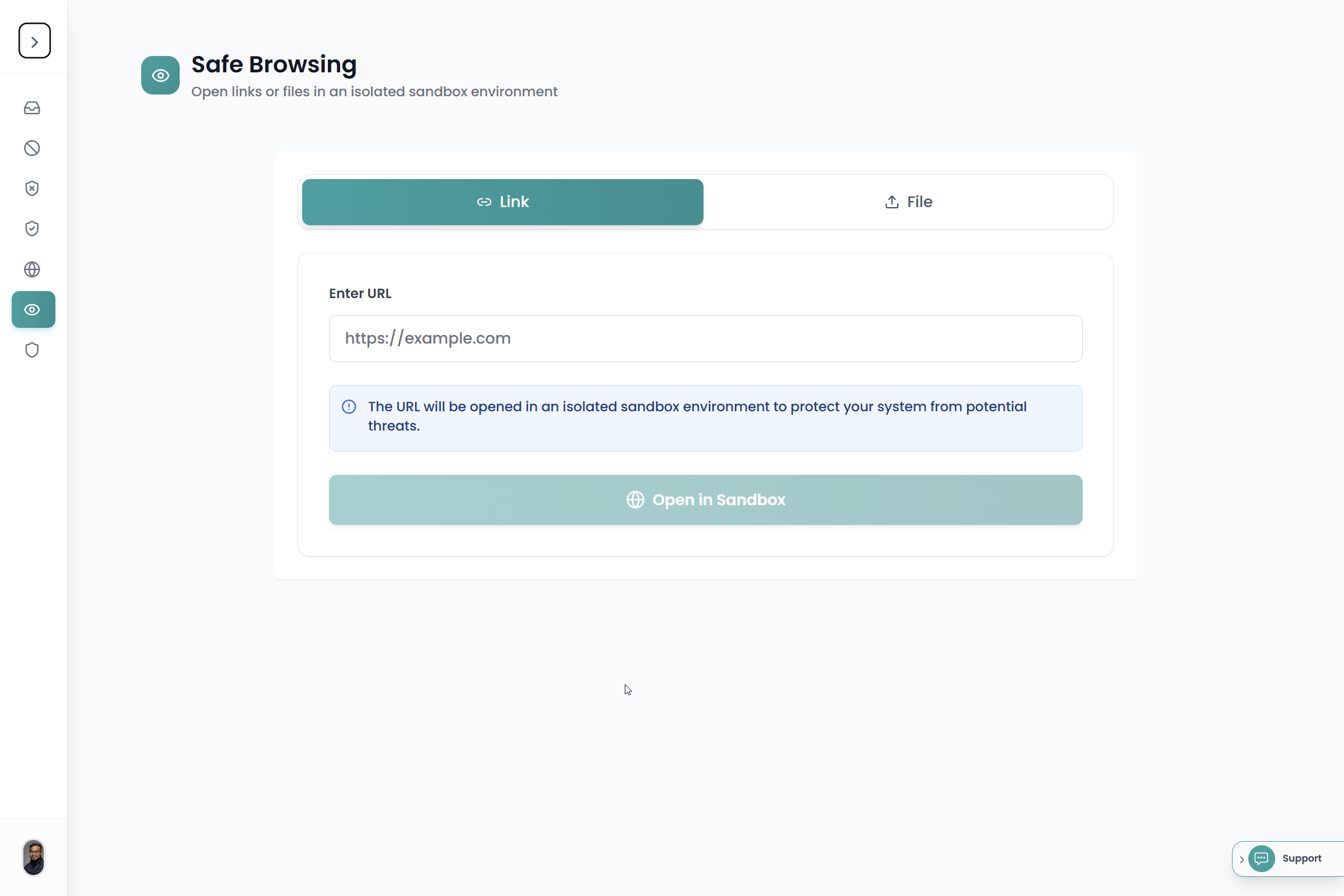
For organizations using email.cybercheck360.com, administrators and users can open any link or file from an email directly in the sandbox from within the admin portal.
Steps:
- Log in to your CyberCheck360 email security portal at email.cybercheck360.com
- Go to "Safe Browsing"
- Paste any Link to open a link in sandbox.
- Navigate to "File" Upload anyfile to open the file in a sandbox.
Note: Uploaded files are removed immediately after the sandbox session is destroyed. Not stored anywhere internally.
4. CyberCheck360 Email Threat Defense — Microsoft Office 365 Add-on
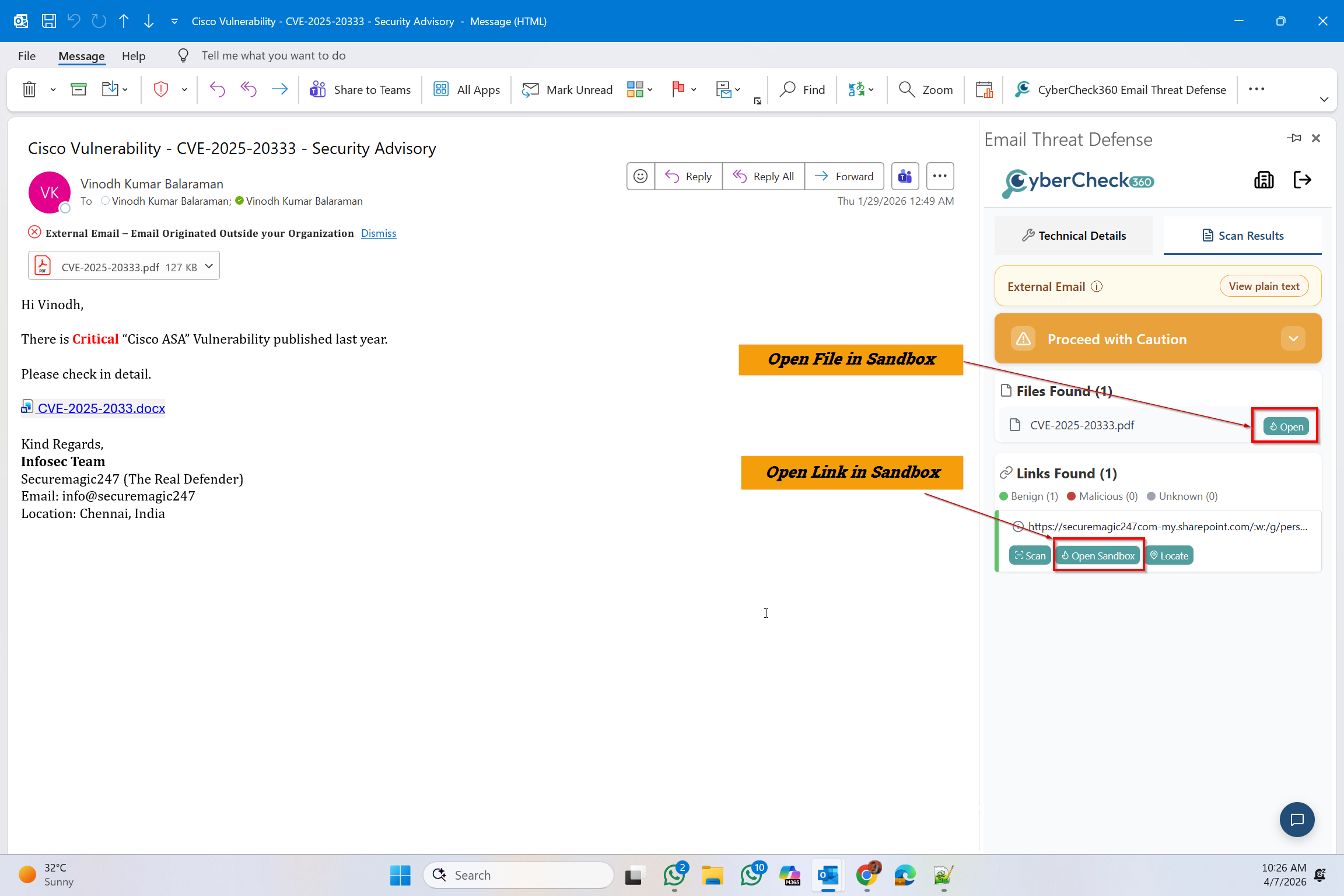
The "CyberCheck360 Email Threat Defense" Outlook Add-on works directly inside your Outlook client and can analyse all emails and links in your mailbox.
Steps:
- Install the CyberCheck360 Email Threat Defense extension from your Microsoft marketplace
- Search "cybercheck360" in https://marketplace.microsoft.com/en-us/
- click "Get it Now" on the "Cybercheck360 Email Threat Defense" app.
- Once installed, you will be able to open the add-on from your toolbar and can analyse all emails and links using the add-on.
- Click "Open Sandbox" next to any link to open it in an isolated session
5. Gmail Add-On
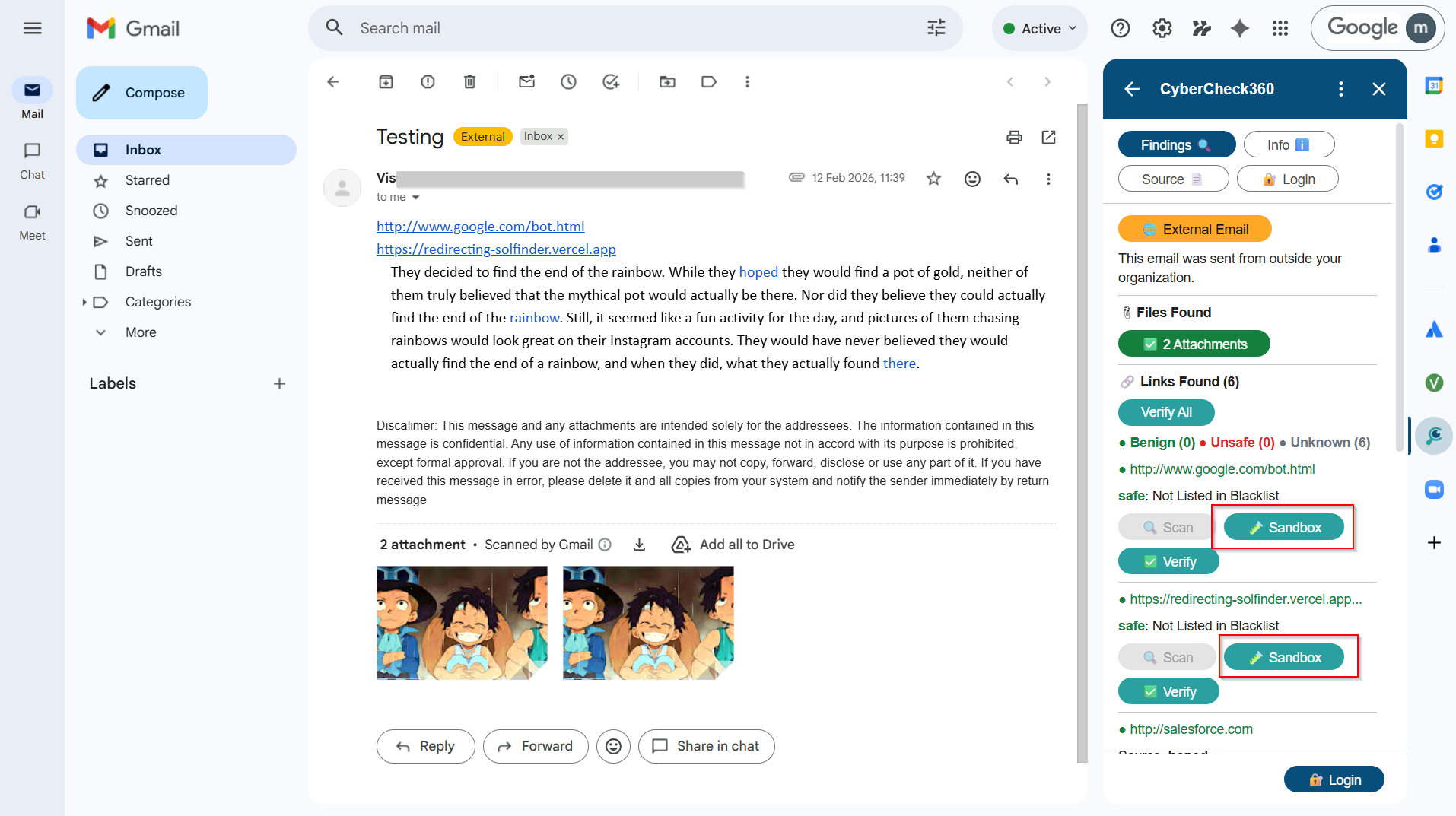
The CyberCheck360 Gmail add-on integrates directly into Gmail and works the same way as the browser extension.
Steps:
- Install the CyberCheck360 add-on from the Google Workspace Marketplace
- Open any email in Gmail
- The add-on panel shows all links found in the email with their status (Benign, Unsafe, Unknown)
- Click "Sandbox" next to any link to open it in an isolated session
Threats Stopped by URL Sandboxing
CyberCheck360's URL sandboxing and secure link isolation protects your organization from a wide range of email-borne threats:
- Phishing attacks - credential theft pages are opened in isolation, not in the local browser
- Ransomware delivery via links - payloads are triggered inside the container, not on the device
- Drive-by downloads - files that auto-download on page load are contained within the session
- Click-by-download malware - silent downloads never reach the local file system
- Zero-day browser exploits - even unknown vulnerabilities cannot escape the isolated container
- Time-of-click redirects - links that change destination after delivery are still intercepted at click time
- Malvertising - malicious ads served on otherwise legitimate pages are isolated
- Tracking and fingerprinting scripts - user identity and device information are not exposed
Get Started
CyberCheck360's URL sandbox is free to try, no account required.
For enterprise deployments, email security integration, or to learn more about CyberCheck360 Secure Link for your organization, visit cybercheck360.com.
Tags: URL Sandboxing, Email Security, Link Isolation, Phishing Protection, Zero Trust, Secure Browsing, CyberCheck360, Click-Time Protection, Browser Isolation, Threat Intelligence