Technical Details Tab
Technical Details Tab
The Technical Details tab provides a comprehensive analysis of the email's metadata, authentication posture, and delivery infrastructure. It is structured into four sections: Header Validation, Basic Info, Sender Domain Details, and Email Path.
Header Validation
The Header Validation section evaluates the email's authentication mechanisms to determine whether the message originates from a legitimate and trusted source. The following protocols are assessed:
| Protocol | Description |
|---|---|
| SPF (Sender Policy Framework) | Verifies that the sending server is authorised to send email on behalf of the domain |
| DKIM (DomainKeys Identified Mail) | Validates the cryptographic signature attached to the email to confirm message integrity |
| DMARC (Domain-based Message Authentication, Reporting & Conformance) | Checks whether the email passes SPF and/or DKIM alignment as required by the domain's published policy |
Each protocol displays one of the following statuses: Pass, Fail, Not Found, or Unknown (?).
Clicking View Headers opens an in-depth Email Header Analysis report in a dedicated Content Preview panel. The report covers message identity (including Message-ID and Return-Path), a structured authentication and trust check table (SPF, DKIM, DMARC, and ARC), a full transport path tracing every server hop from origin to destination, sender domain registration details, and a Final Verdict — comprising an overall threat classification and a sender authenticity assessment. The report can be copied to the clipboard via the Copy button for sharing with IT security or support teams.
Note - This feature is currently not available in Google Add-on.
Non-Login: The header verdict is based on domain age and SPF/DKIM/DMARC results only, as blacklisted URL and domain intelligence is unavailable in guest mode.
Login: The verdict additionally incorporates CyberCheck360's threat intelligence database for a more comprehensive risk assessment.
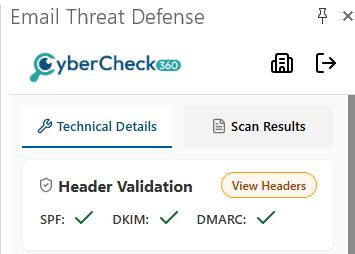
Outlook Add-on - Header-Validation |
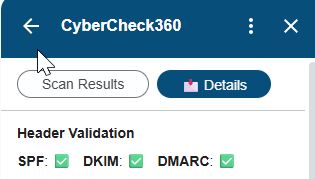
Gmail Add-on - Header-Validation |
Basic Info
Displays the core metadata of the email directly within the add-on panel:
| Field | Description |
|---|---|
| From | Sender's display name and email address |
| To | Recipient's display name and email address |
| Subject | Subject line of the email |
| Date | Timestamp when the email was sent |
| Return-Path | The address where bounced emails are delivered (used to detect spoofing) |
Non-Login behaviour: The Return-Path field is not shown. The field displays the message "Login to view the Return-Path".
Login behaviour: The full Return-Path address is displayed.
Ready to add click-time protection to your email security stack?
See how CyberCheck360 closes the gap that advanced phishing attacks exploit.
Sender Domain Details
Provides registration and infrastructure information about the sender's domain:
| Field | Description |
|---|---|
| Domain | The sender's domain name |
| Organization | The organisation associated with the domain registration |
| Registrar | The domain registrar (e.g., GoDaddy.com, LLC) |
| Registration Date | When the domain was first registered |
| Expiration Date | When the domain registration is set to expire |
| Domain Age | Calculated age of the domain (years and months) |
| Name Servers | DNS name servers used by the domain |
Tip: Newly registered domains (low domain age) are a strong indicator of phishing or fraudulent activity. Always treat emails from very young domains with extra caution.
Email Path
Displays the full routing path the email took from sender to recipient, showing each hop in the delivery chain. Each hop entry includes:
- From — The mail server that sent the message at this hop (with IPv6 address)
- To — The mail server that received the message at this hop
- Protocol — The transmission protocol used (e.g., HTTPS, Microsoft, MAPI)
- Date — The timestamp of the hop
This section helps identify unexpected relay servers or suspicious routing behaviour that may indicate email interception or spoofing.