External Integration - Palo Alto
📘 External List Integration -Palo Alto

External Dynamic Lists (EDLs) are used in Palo Alto Networks Firewalls to dynamically pull IPs, URLs, or domains from external sources and apply them to security policies. This enables automated threat blocking using custom or third-party feeds.
✅ 1. Prerequisites
Before configuring an EDL, ensure the following conditions are met:
-
📌 PAN-OS Version
- Recommended: PAN-OS 9.1 or later for enhanced EDL performance and flexibility
-
📁 EDL Format
- The EDL must be hosted as a plain text file
- Entries must be one per line with no extra formatting
- Example (IP list):
1192.0.2.1
2203.0.113.0/24
- Example (IP list):
🛠️ 2. Requirements
To successfully configure and use an EDL:
-
🔗 Valid EDL URL
- Must be accessible over HTTP or HTTPS
- URL should not require authentication (Palo Alto EDL fetcher does not support auth headers)
-
🔁 Recurring Update
- Palo Alto supports automatic refresh of EDLs (minimum 5-minute interval)
-
🎯 Supported List Types
- IP Address List
- Domain List
- URL List
⚠️ 3. Limitations
-
No Authentication: EDLs cannot use HTTP basic auth or API tokens. Lists must be publicly accessible or IP-restricted at the source.
-
Size Limitations:
- IP address—The PA-3200 Series, PA-5200 Series, and the PA-7000 Series firewalls support a maximum of 150,000 total IP addresses; all other models support a maximum of 50,000 total IP addresses.
Refer below table for URL and Domain count#
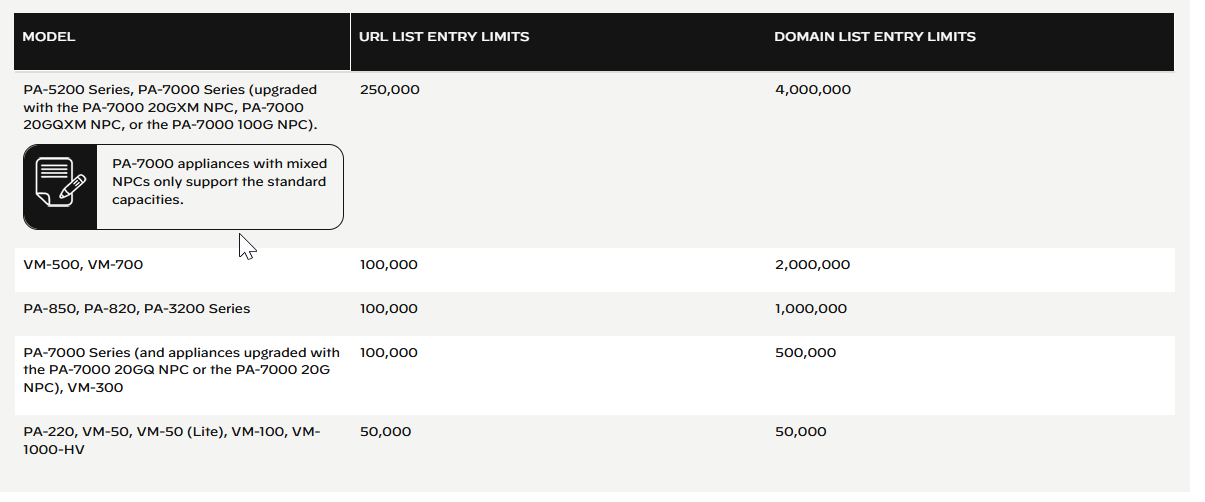
-
Firewall model and memory can affect the actual usable limits
-
No Granular Filtering:
- PAN-OS does not support internal filtering of EDLs (e.g., can't exclude specific entries directly within the firewall)
-
List Format Sensitivity:
- Any formatting errors (e.g., spaces, invalid IPs) can cause the entire list to be rejected
-
Firewall Connectivity Dependency:
- If the web server is unreachable, the firewall uses the last successfully retrieved list for enforcing policy until the connection is restored with the web server
✅ 4. Configure the Firewall to Access an External Dynamic List
Step 1: Customize the service route that the firewall uses to retrieve external dynamic lists. Select Device >Setup > Services > Service Route Configuration > Customize and modify the External Dynamic Lists service route.
Step 2: Find an external dynamic list to use with the firewall.
- To access cybercheck360 List Export section -> Export-list
- To access Cybercheck360 EDL Export section -> Export-EDL
Step 3: Select ObjectsExternal Dynamic Lists.
Step 4: Click Add and enter a descriptive Name for the list.
Step 5: Select Shared to share the list with all virtual systems on a device that is enabled for multiple virtual systems. By default, the object is created on the virtual system that is currently selected in the Virtual Systems drop-down.
Step 6: (Panorama only) Select Disable override to ensure that a firewall administrator cannot override settings locally on a firewall that inherits this configuration through a Device Group commit from Panorama.
Step 7: Select the list Type (for example, URL List).
Ensure that the list only includes entries for the list type. See Verify whether entries in the external dynamic list were ignored or skipped.
If you using a Domain List, you can optionally enable Automatically expand to include subdomains to also include the subdomains of a specified domain. For example, if your domain list includes paloaltonetworks.com, all lower level components of the domain name (e.g., *.paloaltonetworks.com) will also be included as part of the list. Keep in mind, when this setting is enabled, each domain in a given list requires an additional entry, effectively doubling the number of entries that are consumed
Step 8: Enter the Source for the list you just created on the web server. The source must include the full path to access the list. For example, https://1.2.3.4/EDL_IP_2015. If you are creating a list of type Predefined IP, select a Palo Alto Networks malicious IP address feed to use as a source.
Step 9: Click Test Source URL to verify that the firewall can connect to the web server.
Step 10: Specify the Check for updates frequency at which the firewall retrieves the list. By default, the firewall retrieves the list once every hour and commits the changes.
Step 11:EDLs are shown top to bottom, in order of evaluation. Use the directional controls at the bottom of the page to change the list order. This allows you to or order the lists to make sure the most important EDLs are committed before capacity limits are reached.
Step 12":Enforce Policy on an External Dynamic List.